In today’s fast-moving digital world, running a restaurant, café, food shop, or beverage business is no longer only about serving good food and taking care of customers at the table. Restaurant owners now have to deal with many operational challenges every day: how to update menus faster, how to let customers order more conveniently, how to help the kitchen receive orders more accurately, how to reduce mistakes at the cashier counter, and how to make the entire service process smoother, faster, and more professional.
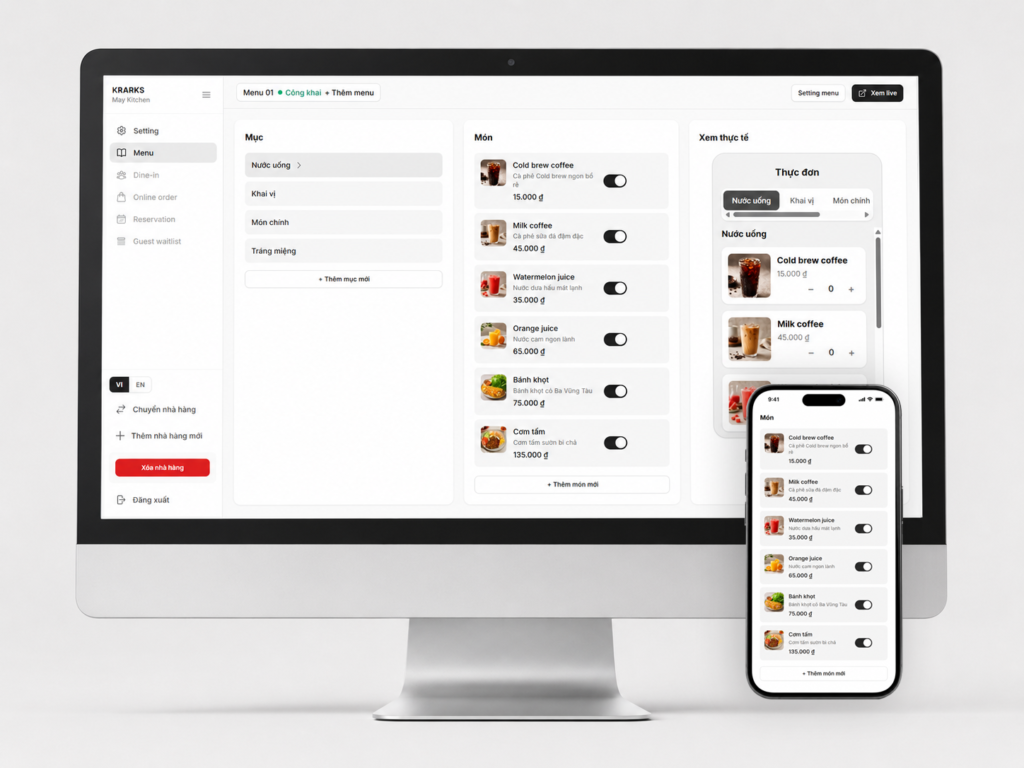
That is why our restaurant management software is being developed with one clear purpose: to help restaurants, cafés, and food businesses digitize their ordering process in the simplest way possible. This software is not only a tool for creating an online menu. It also allows customers to scan a QR code and place orders directly from their table. At the same time, the orders are sent to a Kitchen Display System, helping the kitchen team see exactly what needs to be prepared.
The main goal of this software is simplicity. Users do not need technical knowledge. They do not need to know how to code. They do not need to hire a designer or an IT team. With only a few clicks on a computer or a few simple actions on a mobile phone, restaurant owners can create a professional online menu for their business. From adding food items, updating prices, uploading photos, writing descriptions, organizing categories, creating QR codes, and receiving orders, everything is designed to be easy and practical.
Create an Online Menu Easily
One of the most important features of this software is the ability to create an online menu quickly and easily. Instead of printing paper menus, manually editing them, changing prices, and reprinting them again and again, restaurant owners can manage the entire menu online.
When a restaurant wants to add a new item, the user only needs to enter the item name, price, description, photo, and category. For example, the menu can include appetizers, main dishes, drinks, coffee, milk tea, desserts, combos, or any custom category the restaurant needs. Once the item is saved, it can appear on the online menu immediately.
If the restaurant wants to change a price, hide an item that is sold out, update a food photo, or add a new promotion, the owner can do it directly from a phone or computer. This makes the restaurant much more flexible in daily operations. When there is a new dish, seasonal menu, special combo, or price update, the restaurant does not need to waste time reprinting paper menus.
An online menu also makes the restaurant look more modern and professional. When customers scan the QR code, they can see a clear and organized menu with food photos, prices, descriptions, and categories. This helps customers choose dishes more easily and creates a better first impression of the restaurant.
Customers Can Scan a QR Code and Order at Their Table
Instead of waiting for a staff member to bring a menu, write down the order, and send it to the kitchen, customers can simply scan the QR code placed on their table. After scanning the QR code, the restaurant’s online menu opens directly on the customer’s phone.
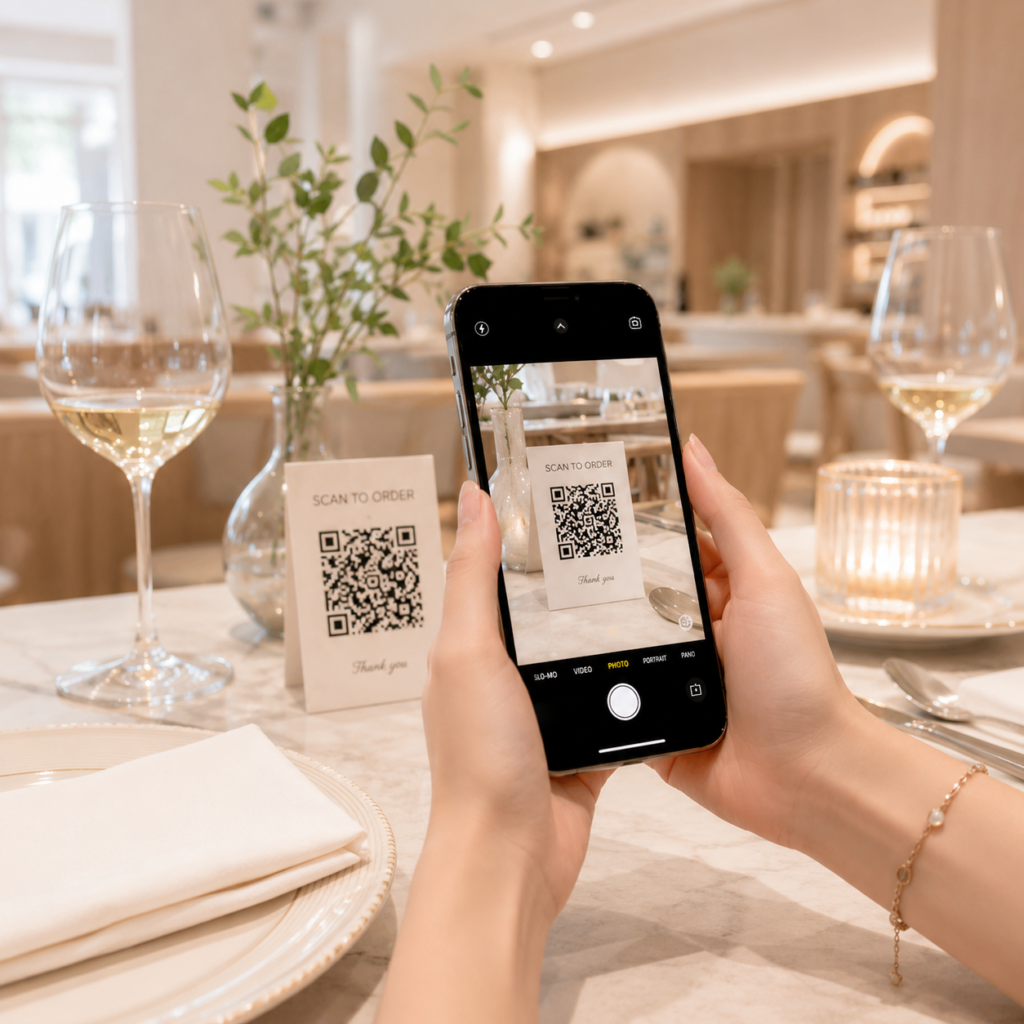
Each QR code can be connected to a specific table number. For example, table 1, table 2, table 3, or any other table inside the restaurant. When a customer places an order, the system knows exactly which table the order comes from. This helps reduce confusion, especially when the restaurant is busy or when many tables are ordering at the same time.
Customers can browse the menu, select items, choose quantities, add notes, and submit the order. For example, a customer can write notes such as “less spicy,” “no onion,” “extra ice,” “no sugar,” “sauce on the side,” or any other special request. These details will be sent clearly to the kitchen, helping the kitchen team understand exactly what the customer wants.
This process saves a lot of time for service staff. Staff members do not need to manually write down every order. They do not need to go back and ask the customer again many times. They also do not need to worry as much about hearing the wrong item or writing down the wrong quantity. For restaurants with a high number of customers, QR code ordering can help speed up service and improve the overall customer experience.
Kitchen Display System Helps the Kitchen Receive Orders Accurately
Another important feature of the software is the Kitchen Display System, also known as KDS. When a customer submits an order from their phone, the order is sent directly to the kitchen screen.
The kitchen team can see all the important order details, including the table number, ordered items, quantity, order time, customer notes, and item options. Instead of using paper tickets or relying on verbal communication from staff, the kitchen can follow every order clearly on a digital screen.
This helps reduce mistakes during food preparation. In a restaurant environment, even a small mistake can affect the customer experience. Preparing the wrong dish, missing an item, ignoring a note, or sending food to the wrong table can cause problems. With the Kitchen Display System, each order is shown clearly and organized properly, helping the kitchen team work more accurately.
The system also helps the kitchen work in a more organized way. When many orders come in at the same time, the kitchen can see which order came first, which table is waiting, which items are still being prepared, and which items are completed. This makes the kitchen workflow smoother, especially during busy hours.
Reduce Mistakes in the Service Process
One common problem in many restaurants is mistakes during the order-taking and service process. Staff may hear the wrong item, forget a quantity, miss a customer note, or send incomplete information to the kitchen. When the restaurant is busy, these mistakes are even more likely to happen.
This restaurant management software helps reduce those mistakes by allowing customers to place orders directly through the online menu. All information is entered into the system and sent digitally. There is no need for handwritten notes or manual communication between the table and the kitchen.
For example, if a customer orders two rice dishes, one peach tea with less ice, and one bowl of noodle soup with no onion, the system will save the exact items, quantities, and notes. The kitchen does not need to guess. Staff members do not need to ask again. The order is clear from the beginning.
As a result, the restaurant can improve service accuracy, reduce customer complaints, and create a more professional dining experience.
Reduce Revenue Loss and Support the Cashier
Besides helping customers order and helping the kitchen receive orders, the software also helps reduce the risk of revenue loss during payment. When orders are recorded in the system, the cashier can easily see which table ordered which items, how much the total is, and what the current order status is.
In a traditional restaurant operation, orders may be written on paper or communicated verbally. This can lead to many problems, such as missing items on the bill, entering the wrong price, forgetting to charge for an item, or mixing up tables. These mistakes can cause the restaurant to lose revenue without the owner noticing immediately.
With a clear order management system, every item ordered by the customer is saved. The cashier can use the system to calculate the bill more accurately. This is especially helpful for restaurants with many employees, multiple shifts, or a high number of customers every day.
The software creates a more transparent workflow between customers, service staff, the kitchen, and the cashier. When all information is synchronized in one system, restaurant owners can manage the business more confidently.
Suitable for Many Food and Beverage Businesses
This software can be used by many types of food and beverage businesses, including restaurants, cafés, milk tea shops, family-owned restaurants, bakeries, food trucks, small bars, quick-service restaurants, and takeaway businesses.
For full-service restaurants, the QR code ordering feature helps customers order faster and reduces the workload for staff. For cafés and drink shops, the online menu helps customers easily view drink sizes, toppings, photos, and customization options. For small food businesses, the software provides a professional system without requiring a large investment in complicated equipment.
The strength of this software is that restaurants can start with simple needs first. A restaurant owner can begin by creating an online menu and QR codes. Later, when the business needs a better workflow, they can use the Kitchen Display System, order management features, and cashier support.
Improve the Customer Experience
Customer experience is extremely important in the restaurant industry. Good food can bring customers back, but slow service, wrong orders, or an unprofessional process can make customers unhappy.
With an online menu and QR code ordering, customers can take more control of the ordering process. They do not need to wait for a staff member to bring a menu. They do not need to wait for someone to come back and take the order. They can browse the menu comfortably on their own phone.
A menu with photos, descriptions, and clear prices helps customers make decisions more easily. First-time customers can explore the full menu, read item descriptions, and choose what they like. Returning customers can quickly order their favorite items again.
QR code ordering also creates a modern and convenient experience. This is becoming more common in the food and beverage industry, especially as customers are now more familiar with using their phones for ordering, payments, and service interactions.
Save Time and Reduce Operating Costs
One of the biggest benefits of this software is that it helps restaurant owners save time during daily operations. Updating the menu, managing food items, receiving orders, sending orders to the kitchen, and supporting the cashier can all happen in the same system.
Instead of printing new paper menus every time prices change or new items are added, the owner can simply update the menu online. Instead of relying completely on staff to take every order, customers can place orders themselves. Instead of the kitchen reading handwritten tickets or receiving verbal messages, the kitchen can view orders directly on a screen.
These small improvements can create a big impact over time. The restaurant can serve customers faster, reduce mistakes, lower pressure on staff, and improve customer satisfaction.
Simple Design for Everyday Users
Not every restaurant owner is familiar with technology. That is why the software is designed to be simple, clear, and easy to use. Users do not need to spend a long time learning the system. Main features such as creating a menu, adding items, updating prices, generating QR codes, viewing orders, and managing the kitchen screen are arranged in a simple and understandable way.
Restaurant owners can use a computer when they want to manage the full system, or they can use a mobile phone when they need to make quick updates at the restaurant. This flexibility makes the software more practical for real restaurant operations.
The goal is not to create a complicated system with too many difficult features. The goal is to create a practical tool that solves real problems for restaurants, cafés, and food businesses.
A Simple Digital Transformation for Restaurants
Digital transformation does not always need to begin with a large, expensive, or complicated system. For many restaurants and cafés, starting with an online menu, QR code ordering, and a Kitchen Display System is already enough to improve daily operations.
This restaurant management software is built with that idea in mind: simple, practical, and easy to apply. Restaurant owners can quickly bring their menu online, allow customers to order more conveniently, help the kitchen receive orders more accurately, and help the cashier calculate bills more clearly.
In the future, as the restaurant grows, the system can continue to expand with more features such as online payments, order reports, revenue reports, staff management, table management, inventory management, and POS integrations. But even from the first step, the software can already bring clear value to daily restaurant operations.
Conclusion
This restaurant management software is more than just an online menu creator. It is a solution that connects customers, the kitchen, and the cashier in one clear workflow. Customers can scan a QR code to view the menu and place orders at their table. The kitchen can receive orders directly through the Kitchen Display System. The cashier can review ordered items and calculate bills more accurately. Restaurant owners can manage menus more easily, reduce mistakes, and lower the risk of revenue loss.
With a simple design, easy-to-use features, and practical tools for different food and beverage businesses, this software helps restaurants, cafés, and small food shops adopt modern technology in an easy way. There is no need for a complicated setup. There is no need for technical skills. With only a few simple steps, restaurant owners can create an online menu and start serving customers in a more modern, efficient, and professional way.
This is a solution for restaurant owners who want to operate more professionally, serve customers faster, manage orders more clearly, and deliver a better dining experience in the digital age.