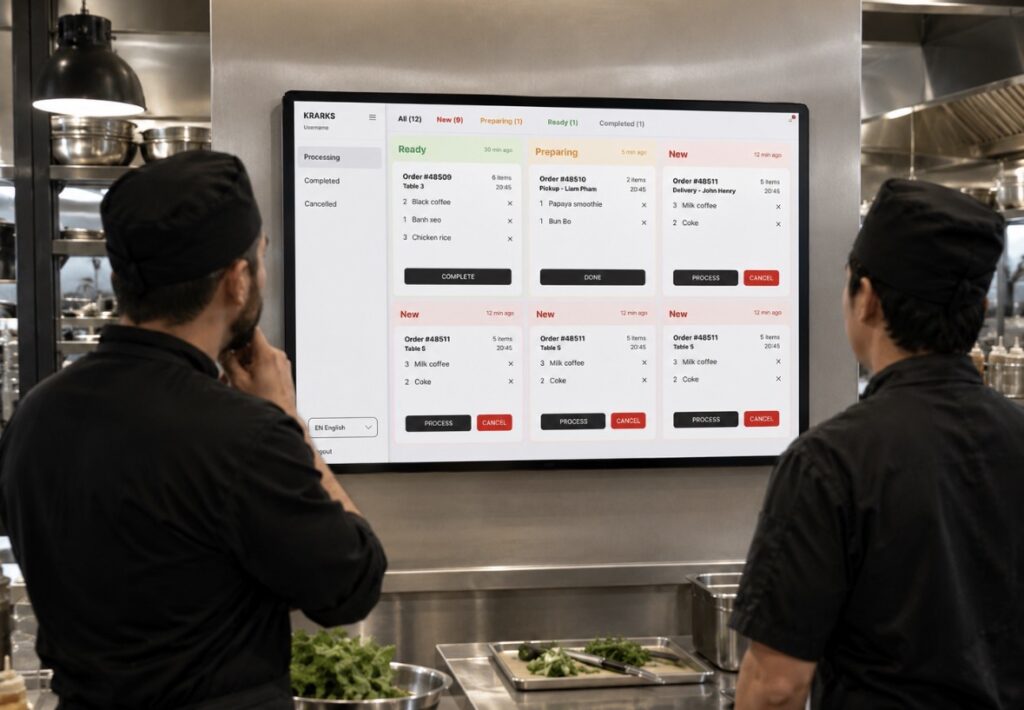
Kitchen Display System: Streamline Your Kitchen with Krarks POS
In a busy restaurant, every second matters. Orders arrive continuously, customers expect fast service, and kitchen staff must work efficiently without missing a single item. Traditional paper tickets can easily become disorganized, damaged, or misplaced, leading to delays, incorrect orders, and frustrated customers.
The Krarks POS Kitchen Display System (KDS) replaces paper tickets with a modern digital kitchen management solution. Orders appear instantly on a kitchen display, allowing chefs and kitchen staff to prepare meals faster, reduce mistakes, and improve communication between the front of house and the kitchen.
What Is a Kitchen Display System?
A Kitchen Display System (KDS) is a digital screen that replaces printed kitchen tickets.
Whenever an order is placed through the POS, QR Menu, self-order kiosk, or online ordering system, it is immediately displayed on the kitchen screen.
Instead of relying on paper, your kitchen receives organized, real-time order information that is easy to read and manage.
Real-Time Order Delivery
Speed is one of the biggest advantages of a digital kitchen.
As soon as a customer places an order, it appears instantly on the Kitchen Display without waiting for a receipt to print or a server to deliver a ticket.
Kitchen staff can immediately begin preparing food, reducing delays and improving overall service speed.
Eliminate Paper Tickets
Paper tickets often create unnecessary problems.
They can:
- Fall off the printer
- Become wet or damaged
- Be difficult to read
- Get mixed with other orders
- Be lost during busy hours
Krarks Kitchen Display System eliminates these issues by displaying every order digitally with clear formatting and organized workflows.
Improve Order Accuracy
Order mistakes cost both time and money.
Krarks KDS displays complete order details, including:
- Menu items
- Quantity
- Customer notes
- Special requests
- Item modifiers
- Add-ons
- Cooking instructions
Kitchen staff receive clear information, reducing misunderstandings and ensuring every order is prepared correctly.
Organize Orders by Priority
Not every order should be prepared in the same sequence.
Krarks KDS intelligently organizes incoming orders so kitchen staff can easily identify:
- New orders
- Orders in progress
- Priority orders
- Delayed orders
- Completed orders
Visual indicators help chefs stay focused even during the busiest service periods.
Track Preparation Time
Knowing how long each order takes helps restaurants improve efficiency.
Krarks Kitchen Display System automatically tracks preparation times for every order.
Managers can monitor:
- Average preparation time
- Longest waiting orders
- Kitchen performance
- Peak service periods
- Bottlenecks
These insights help improve workflow and reduce customer waiting times.
Multiple Kitchen Stations
Large restaurants often have separate preparation areas.
Krarks KDS supports multiple kitchen stations, allowing orders to be routed automatically based on menu items.
Examples include:
- Grill station
- Fry station
- Salad station
- Pizza station
- Dessert station
- Beverage station
- Sushi station
Each station only receives the orders relevant to its responsibilities, reducing confusion and improving efficiency.
Color-Coded Order Status
Visual organization helps kitchens operate more smoothly.
Krarks KDS uses color indicators to quickly identify order status.
For example:
Red – New Order
Orange – Preparing
Green – Ready
Black – Served
Kitchen staff can understand the status of every order with a quick glance.
Reduce Communication Errors
Traditional kitchens often rely on verbal communication between servers and chefs.
During busy hours, this can easily lead to misunderstandings.
Krarks KDS automatically delivers orders directly from the POS system to the kitchen, eliminating unnecessary conversations and reducing the risk of mistakes.
Seamless Integration with QR Menu
When customers place orders using the Krarks QR Menu, those orders appear instantly on the Kitchen Display System.
No staff intervention is required.
This automation allows restaurants to serve more customers with fewer employees while maintaining excellent service quality.
Integrated with Online Orders
Restaurants offering online ordering can manage every order through one kitchen screen.
Whether orders come from:
- Dine-in customers
- QR Menu
- Online ordering
- Takeaway
- Delivery
- Self-service kiosks
Everything appears within the same organized workflow.
Improve Kitchen Productivity
Digital workflows allow chefs to spend less time organizing tickets and more time preparing food.
Benefits include:
- Faster preparation
- Better coordination
- Fewer interruptions
- Less paperwork
- Improved teamwork
- Reduced stress during peak hours
A more organized kitchen leads to better service throughout the restaurant.
Real-Time Management
Restaurant managers can monitor kitchen performance in real time.
They can easily identify:
- Kitchen workload
- Average preparation time
- Delayed orders
- Peak operating hours
- Staff productivity
This information helps managers optimize staffing and improve operational efficiency.
Cloud-Based Kitchen Management
Krarks Kitchen Display System is fully integrated with the cloud-based Krarks POS platform.
Benefits include:
- Real-time synchronization
- Automatic updates
- Secure cloud storage
- Multi-device support
- Remote management
- Reliable performance
Every order remains synchronized across your restaurant, ensuring smooth communication between the dining area and the kitchen.
Perfect for Every Food Business
Krarks Kitchen Display System is ideal for:
- Restaurants
- Coffee shops
- Cafés
- Food trucks
- Bakeries
- Pizza restaurants
- Fast food restaurants
- Bubble tea shops
- Dessert shops
- Hotel restaurants
- Ghost kitchens
- Cloud kitchens
Whether you prepare 50 or 5,000 orders each day, Krarks KDS helps keep your kitchen organized and efficient.
Why Restaurants Choose Krarks Kitchen Display System
Krarks Kitchen Display System transforms kitchen operations by replacing paper tickets with a fast, reliable, and intelligent digital workflow.
By combining real-time order delivery, automated routing, preparation tracking, and seamless integration with the entire Krarks POS ecosystem, restaurants can reduce errors, increase speed, and improve the overall dining experience.
Transform Your Kitchen with Krarks POS
A well-organized kitchen is the heart of every successful restaurant.
With the Krarks Kitchen Display System, your team can prepare orders faster, communicate more effectively, and deliver consistently excellent service to every customer.
Replace paper tickets with a smarter digital kitchen solution and experience the efficiency of Krarks POS.